Mindfindr API
This document outlines the integration between the Mindfindr SaaS solution and a client’s proprietary service environment. By leveraging the Mindfindr API, clients can automate assessment management and data retrieval within their own workflows.
1. Integration overview
The integration is established via a client-specific API Token. This allows the client’s system to communicate securely with the Mindfindr engine, extending the platform’s capabilities to fit specific organizational roles, communication strategies, and operational models.
** Each Mindfindr client (tenant) have an client specific API Token.
2. Core entities
The Mindfindr service manages several key data objects that act as unique identifiers (keys) for the integration:
Test container(s): Managed setting of assessments and configurations.
User(s): Customer/tenant internal staff or administrators managing the process.
Participants: The individuals performing the assessment(s)..
These entities allow the client to map Mindfindr data to their own service, enabling custom user role assignment, organizational structuring, and enhanced communication development.
3. The Assessment process
The Mindfindr Engine (Powered by Mindfindr) serves as the core processing unit. The standard assessment workflow follows these steps:
Onboarding & Compliance Mindfindr provides clear instructions to the participant regarding the assessment process. The system automatically gathers required GDPR acceptance. This includes the explicit review and approval of Terms of Service and Privacy Notes before any data is collected.
1. Response collection: Participants answer a 120-question assessment.
2. Data processing: The Mindfindr engine calculates results based on the responses.
3. Result delivery: Data is made available to the client system in two formats: Raw Data: JSON/XML format for deep integration and custom visualization. Assessment Document: A generated PDF report for easy sharing and archival.
4. Technical workflow
Key principle is that the client system acts as the orchestrator, using the Mindfindr API to trigger assessments and fetch results, which are then stored or displayed within the client’s own service (UI/UX).
Authentication: All requests must include the API Token in the header.
Data transfer: Assessment results are transferred from Mindfindr to the client’s service solution in the preferred format.
Customization: Clients can use the raw data to build custom logic, such as automated feedback loops or HR dashboard integrations.
Workflow basic process summary
To visualize how the client system interacts with the Mindfindr SaaS platform, here is a technical sequence diagram. This flow covers the lifecycle from initial participant creation to the final retrieval of assessment data.
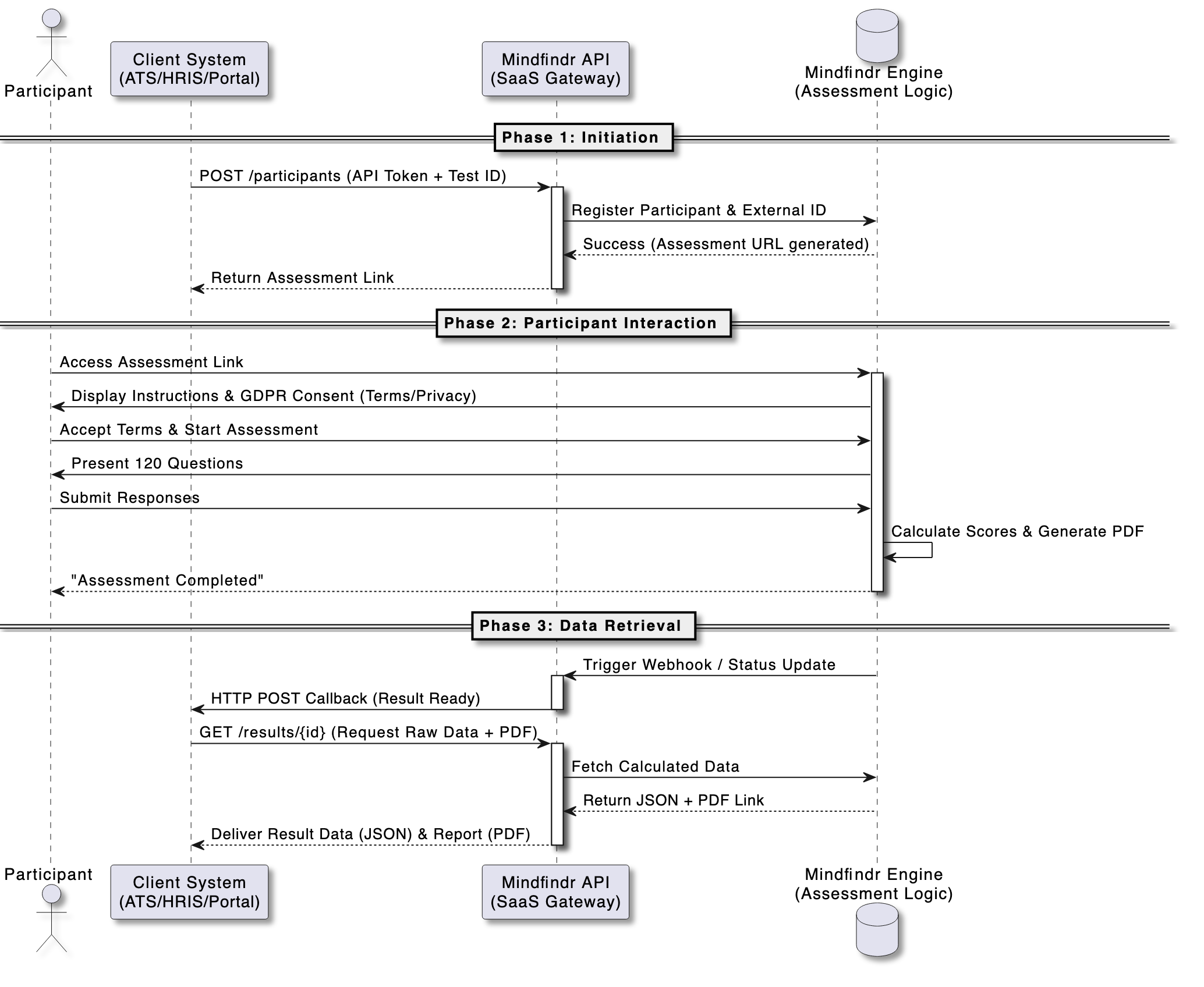
Technical sequence: Assessment lifecycle
1. Initiation: The Client System sends a request to the Mindfindr API to create a participant and assign them to a specific Test (Test container).
2. Instruction & consent: When the Participant accesses the provided link, the Mindfindr Engine serves the instructions and the mandatory GDPR Consent (Terms & Privacy Notes).
3. Assessment: Once consent is granted, the participant completes the 120-question engine.
4. Processing: The Mindfindr Engine calculates the results and generates both raw data and the PDF report.
5. Completion notification: Mindfindr sends a Webhook (Callback) or the Client System polls the API to confirm the assessment is complete.
6. Data retrieval: The Client System fetches the Raw Data (JSON) for internal processing or downloads the PDF Assessment Document.
Regardless of the specific use case, every integration follows a standard lifecycle that begins with identification by mapping your internal entity IDs, such as employees or candidates, to Mindfindr participants.
This is followed by contextualization where participants are assigned to specific test containers to ensure they receive the correct assessment battery.
Finally, synchronization is achieved through the use of webhooks or polling to ensure your local database is updated the moment a participant completes their 120-question journey.
Use cases
To provide a clear roadmap for developers and system architects, we have outlined several API Integration Use Cases. These scenarios demonstrate how the Mindfindr SaaS platform acts as a modular “intelligence engine” that can be embedded into existing business ecosystems.
The power of the Mindfindr API lies in its ability to bridge the gap between complex psychological assessment logic and practical business operations. Whether you are automating a high-volume recruitment funnel or building a sophisticated internal talent development portal, the integration remains consistent: your system handles the organizational context, while Mindfindr handles the assessment science and data compliance.
CASE: Automated Recruitment Pipeline
In this scenario, a candidate applies for a job in the client’s Applicant Tracking System (ATS). The ATS triggers the assessment automatically.
Trigger: Candidate moves to the “Assessment” stage in the ATS.
API action: The ATS sends a POST request to Mindfindr to create a new Participant and assign them to a specific Test Container.
User experience: The candidate receives an automated email with a link. Upon clicking, they see the Mindfindr Instructions & GDPR Consent page.
Result: Once the 120 questions are completed, the Mindfindr Engine pushes a webhook notification back to the ATS, which then downloads the PDF Assessment Document directly into the candidate’s file.
CASE: Consultant Dashboard (Multi-Client Management)
A coaching or consulting firm uses Mindfindr to provide services to multiple external customers, each with different privacy requirements.
Setup: The consultant creates unique Test Containers for each of their customers via the API.
GDPR management: Each container is configured with specific Privacy Notes relevant to that specific project.
Execution: Participants complete the 120-question engine.
Delivery: The consultant’s proprietary dashboard pulls the Raw Data to provide a “Executive Summary” view for the client, while keeping the full PDF Report available for 1-on-1 coaching sessions.
CASE: Internal talent audit & organizational mapping
A large corporation wants to map the strengths of their existing workforce using their own Internal HR Portal.
Trigger: HR Admin selects a department in the company portal to undergo evaluation.
API action: The portal syncs existing Users and Participants via the API, mapping them to internal company roles.
Data flow: Participants complete the assessment. The client system fetches the Raw Data (JSON) for the entire department.
Outcome: The client’s portal uses the raw data to generate a custom “Team Strengths Matrix” or “Communication Heatmap” without the users ever leaving the company’s own intranet.